
Product Overview
• Ensures correct JTAG functionality on first-pass silicon
• Verifies that BSDL customer file matches Verilog design
• Generates high quality production test vectors
• Helps find fab-related pad or JTAG logic yield problems
• Used successfully on hundreds of production IC tape-outs
Product Description
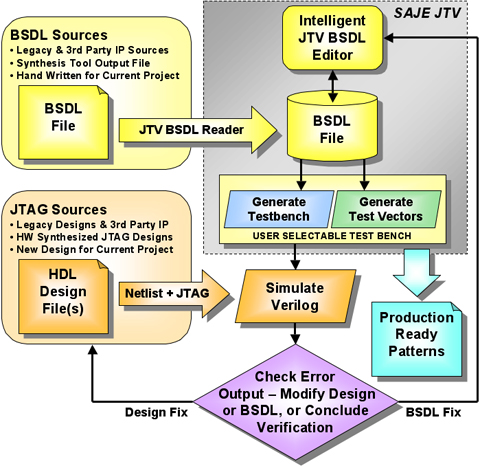
SAJE JTV has been developed over the last ten years by the JTAG practitioners of Freescale Semiconductor (formerly Motorola SPS). JTV’s unique technology is protected under US Patent. The tool takes a BSDL driven approach and is well suited for flows in which the BSDL is written manually or is derived from earlier designs with the same or similar TAP design. For 3rd party synthesis tool derived JTAG designs and BSDL files, JTV serves as an independent verification tool to further lower the risk of possible defects.
BSDL is a subset of VHDL that describes the JTAG (IEEE 1149.1) implementation for a particular device. For a device to be JTAG compliant, it must have an associated BSDL file, and it is therefore part of any semiconductor product packaging. JTAG board-level test designs use the BSDL information to determine how to access and use a device in the system’s JTAG chain at the board-level. SAJE JTV includes an interactive BSDL (Boundary Scan Description Language) editor for creating or converging to an accurate BSDL that reflects the design. The BSDL editor provides the user a forms driven specification environment to develop the BSDL in.
The JTAG implementation for an IC product is essentially two elements, the boundary scan devices associated with the primary I/O (i.e. the chip’s pins) and a test-access-port, a.k.a. the TAP. SAJE JTV provides a large and robust suite of automatically generated tests to verify a JTAG implementation. During the design phase, these tests support comprehensive design verification while eliminating the necessity to write verification testbenches manually. For silicon debug, JTV automatically generates high-quality production ready test patterns which facilitate first-silicon bring-up on debug stations or automatic test equipment (ATE). During manufacturing, the tests provide high-quality data to drive yield analysis processes.
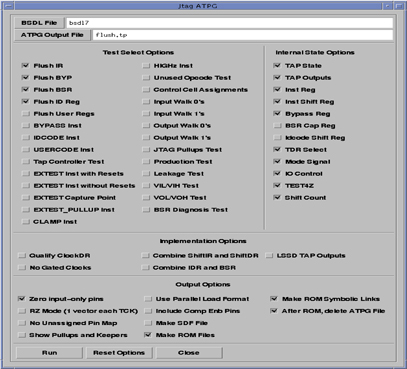
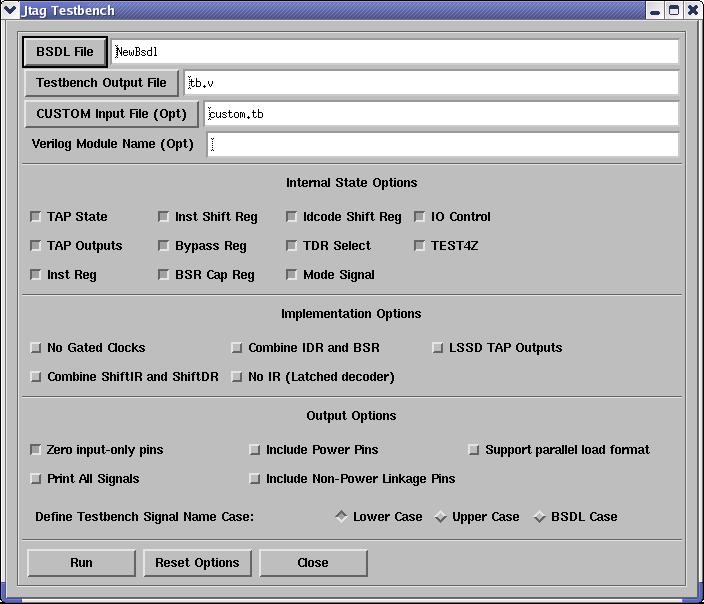
The test suite includes 27 individual test procedures, 9 optional internal JTAG-related test points, 5 implementation options, and 10 output options. For practical purposes, the tests are ordered from low to high complexity. In support of efficient use of designers’ time, the first simple tests provide rudimentary data flushing operations typical of early unit test steps. Advanced complex tests fully exercise the JTAG implementation against the requirements of the 1149.1 functional standards. Both fault-simulated production test patterns and parametric tests are provided.
SAJE JTV Features
• Supports many design styles including gated clock and non-gated clock design
• Generates a verification testbench from a BSDL file with means to fully customize it with a user-generated script
• Test and testbench generators can be invoked by scripts from Unix command line
• Generates commented simulation output to reduce debugging effort
• Provides response prediction of internal JTAG test points for earlier detection of problems
• Provides self-checking environment
• Provides parallel-load format (no shifting) to reduce simulation times for lengthy tests with large designs
• Supports IEEE Std. 1149.1-1993 and Std. 1149.1-2001
• Development for IEEE Std. 1149.6-2001 is in progress
• User guide includes unique “Designer’s Decision Guide”
Product User Interface
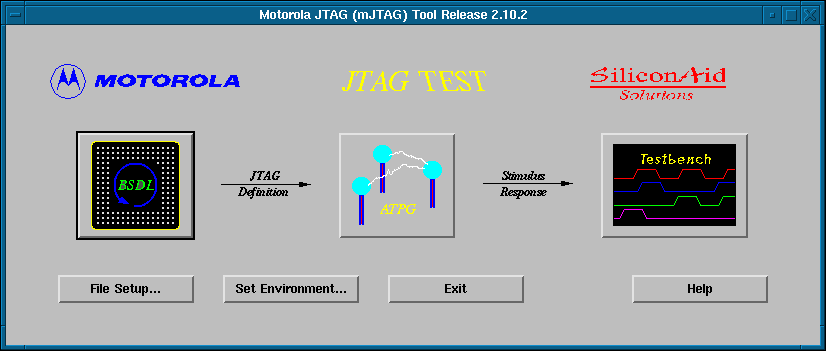
The SAJE JTV startup screen is shown below. The three button choices will invoke the BSDL editor, the JTAG ATPG GUI, or the JTAG testbench GUI respectively
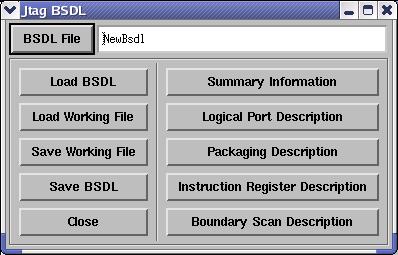
The BSDL editor facilitates the creation of a new BSDL file or the editing of an existing BSDL file for modification. The BSDL editor startup screen is shown at right.
The ATPG GUI as shown at right is used to generate the test vectors for the 27 built-in JTAG tests. Test are ordered from simplest to most complex to facilitate the design verification and subsequent silicon debug process in the ATE environment. The ATPG GUI manages the vector generation for the built-in tests and provides a means of configuring the vector generation to address a comprehensive set of JTAG internal state and implementation options.
The Testbench GUI, as pictured at right, provides control over testbench related input/output files, and similar to the ATPG GUI, configuration control over the internal JTAG state and implementation options as illustrated.
SAJE JTV offers the ability to design, implement, and test robust JTAG product test features in complex IC designs. Additionally, it supports the creation and validation of accurate BSDL files, a critically important deliverable for virtually all digital IC’s produced for delivery into the system market. SAJE JTV is unique in its ability to verify that the chip design is JTAG-compliant and that the BSDL file accurately describes the JTAG design.